The OPM Manager
| Latest version | v1.0.1 |
| Released on | 13-aug-2026 |
| Download latest version | Post on patreon |
This guide and other documentation on this site use 'photomode mod' and 'camera tool' and these mean the same thing. To be consistant this page will only use 'photomode mod'.
To help you manage the various photomode mods I've released over the years, I've built the OPM Manager. This is a simple tool to discover which photomode mods there are, quickly access their page on patreon or in the documentation, install new versions and launch the ones you've installed. This document will briefly introduce the manager and show what the various functions are.
It's not required to use the OPM Manager for using the Photomode Mods I made. If you want to unpack the photomode mod zip files in a folder yourself, that's totally ok. The OPM Manager is more a convenient helper to have everything in one place.
Getting started
To get started, first download the latest version of the OPM Manager from Patreon. It's available for everyone using the link at the top of this page. After you've downloaded the zip file, please unpack it in a folder, I recommend a folder in Documents, e.g. OPM Manager. After you've done that, start the OPMManager.exe.
It'll open the GUI which looks something like the following.
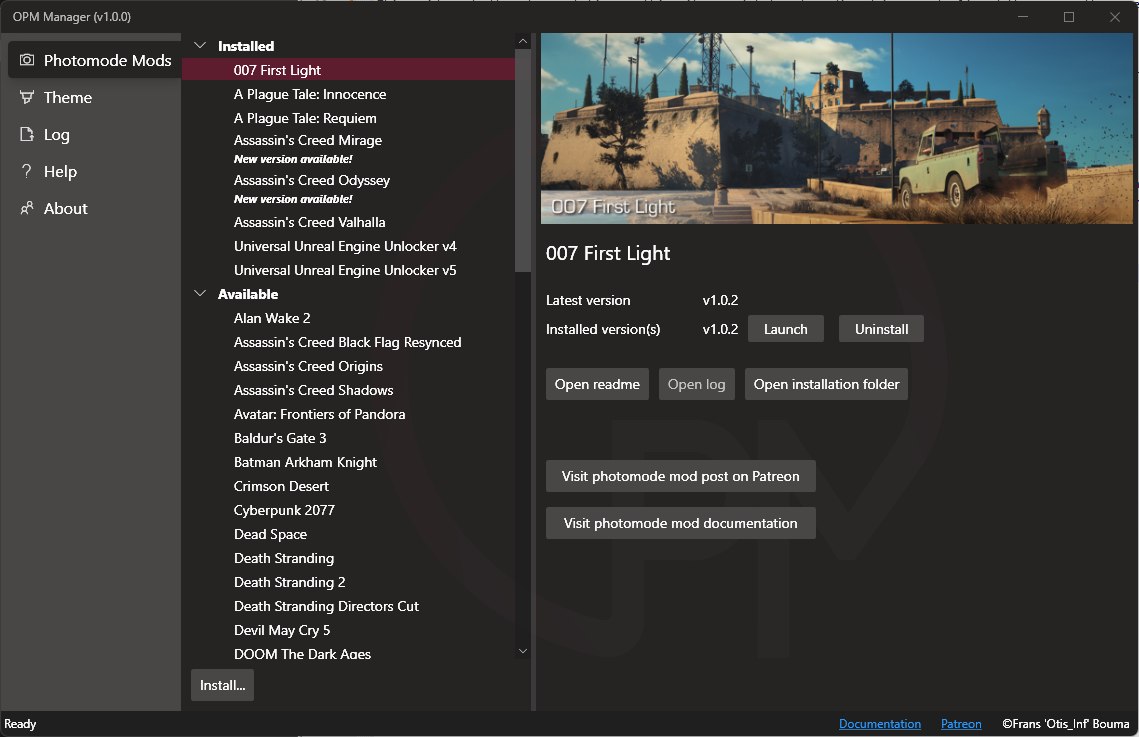
The OPM Manager GUI
The tabs on the left pretty much speak for themselves, "Theme" is to change the theme of the gui, "Log" will tell you where what is happening and "Help" contains a brief description what to do if you get lost. The important tab to look at is Photomode Mods. This tab contains on the left a tree with all the installed and available photomode mods, and on the right the details of the selected photomode mod.
Installing your first photomode mod
The first time you start the OPM Manager, there aren't any photomode mods installed. It uses its own folder structure so you have to add the photomode mods manually. If you already have downloaded a photomode mod from Patreon, you can skip ahead and install it. If not, please download a photomode mod from my Patreon to get started.
To install a photomode mod, either use the Install button in the bottom left corner or drag and drop a photomode mod .zip file onto the OPM Manager GUI. The Install button will allow you to navigate to the .zip file of the photomode mod to install. If you want to install multiple zips at once, you can drag them in one go onto the OPM Manager GUI. The install button supports 1 zip at a time.
The installation is pretty quick and after a second or so, the OPM Manager will tell you it has successfully installed the photomode mod. After you've clicked 'Ok' it will select the one you installed and it'll also show the installed photomode mod under Installed in the tree on the left side of the Photomode Mods tab.
It might be you need to perform an extra step, e.g. install a HUD toggle manually using Reshade. The OPM Manager will tell you this after the installation has been completed and will ask you to open the readme file. It's recommended to do so. You likely also need to open the installation folder, which you can do by clicking the Open installation folder to get access to e.g. the HUD toggle files.
Launching a photomode mod's IGCSClient
To start a photomode mod, you have to run the IGCS Client. To do so, simply select the photomode mod under 'Installed' and then on the right click Launch. After clicking launch the OPM Manager will minimize itself and you should see the IGCSClient's main window instead (it might take a second or two). It's adviced to first launch the game, wait for its main menu to load and then launching the photomode mod you want to use.
Installing multiple versions
The OPM Manager will automatically uninstall an older version of a photomode mod if you install a new version, except for the Universal Unreal Engine Unlockers (UUUs). The OPM Manager supports multiple versions for the UUUs to be installed. Having older versions of regular photomode mods is in general not really helpful as just one will work with the game they are built for.
Uninstalling a photomode mod.
If you want to get rid of a photomode mod, you can simply navigate to the photomode mod under Installed, click it and then on the right click Uninstall. The OPM Manager will ask you to confirm the removal of the photomode mod. After the photomode mod has been deleted from your harddisk, it'll be removed from the Installed list and placed back into the list of Available photomode mods.
Other features
The OPM Manager has some other features you might need, these are described below.
Installed photomode mods have a couple of buttons that aren't available on photomode mods that aren't installed:
- Open readme
- This is an important feature for when you get started, and extra information regarding various specifics of the photomode mod. It's highly recommended you read it.
- Open log
- Every photomode mod writes a log file with the actions it took and in the case of errors, what went wrong. To view it (if it's available), click this button
- Open installation folder
- The OPM Manager installs all photomode mods in their own folder inside a specific folder. To open the specific folder for a photomode mod, click this button. This is important if you e.g. have to manually install a HUD toggle by copying some files from a folder in the photomode mod installation folder to the game folder. Don't worry, it sounds perhaps more complicated than it is.
The two buttons Visit photomode mod post on Patreon and Visit photomode mod documentation are available when the photomode mod is installed and when it's not installed, so you can quickly navigate to the right source of information.
Data retrieval
The OPM Manager uses a file that's produced by my own release manager tool, which is a json file (so just a text file) which contains the photomode mod information used by the OPM Manager. This file is cached locally so the next time you start the OPM Manager and you e.g. don't have internet access, it will load it from the local cache. This also means that the first time you start the OPM Manager it has to load that file from the internet.
All banner images are loaded on the fly as well, and both the json file and the images are coming from a public github repository: https://github.com/FransBouma/OPMManagerData.
Which photomode mods are supported?
The OPM Manager works with all photomode mods which have their own documentation page on this site. I've made more photomode mods however, which you can find attached to the pinned post on patreon. These older photomode mods aren't supported by OPM Manager. If it's not in the list of photomode mods listed in OPM Manager, it's not supported. In that case you have to unpack the zip file manually into a folder.
Questions?
If you have questions or feedback, please visit the opm-manager-feedback channel in the Discord server.